Every squad's flag, on the class screen
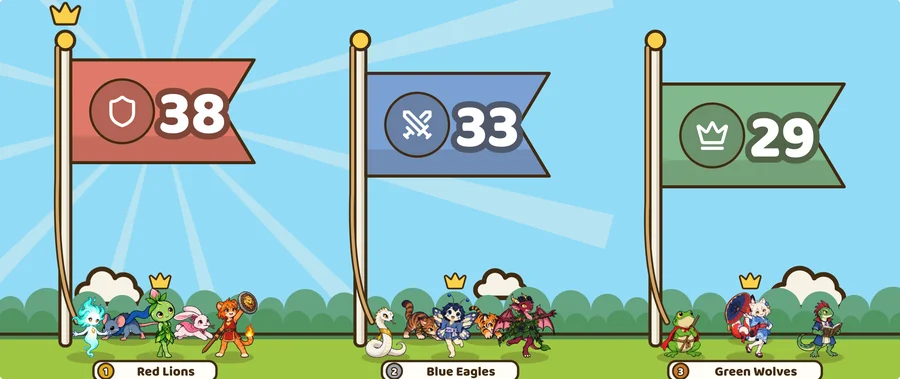
Split the class into squads, and every point a student earns lifts their squad's flag on the class screen. When the time is up, the highest flag wins and everyone in that squad gets the prize. There is no tally to keep on the whiteboard.
Squad Legends is part of Learnify, a classroom management app for ages 5 to 18. It works on the free plan for one class of up to 30 students, and students need no devices or accounts.
By Rey, a teacher who makes Learnify.
In your class, open Activities and pick Squad Legends. Choose two to six squads, and Learnify deals the students out by level and rank so nobody starts behind.
Name each squad and pick its colour and badge. Drag students between squads, or onto the bench to sit this game out. Shuffle deals them out again, still balanced.
From a one-day Match to a two-month Championship. The longer it runs, the bigger the prize you can pick for the winning squad.
Every point a student earns lifts their squad's flag, and a minus point lowers it. When the time is up, press Finish & give rewards.
Squad Legends runs for a day or longer. For a team round inside one lesson, the review games split the students marked present into 2 to 8 teams and give the winners points. To split a list into groups with no account at all, use the free random group maker.
Yes. Squad Legends works on every plan, including the free plan for one class of up to 30 students.
One day, three days, a week, two weeks, a month or two months.
Yes. While you set the game up, drag them between squads or onto the bench.
Yes. A minus point takes the same points off the squad's total.
No. You run it from your laptop, and the flags show on the class screen. Students have no logins or passwords.
Free for one class of up to 30 students, with no student devices or accounts.